
Linux文件系统
- 文件名名称严格区分字符大小写;
- 文件可以使用除了
/以外的任意字符; - 文件名长度不能超过255个字符;
- 以
.开头的文件为隐藏文件,除了:-
.:当前目录 -
..:当前目录的上一级目录
-
工作目录: working directory
家目录: home
常用命令:
pwd
- printing working directory(显示工作目录)
cd
change directory(切换目录)
cd [/PATH/TO/SOMEDIR]-
cd或cd ~切换用户的家目录 -
cd ~USERNAME: 切换至指定用户的家目录 -
cd -:在上一次所在目录与当前所在目录来回切换 - 相关的环境变量:
-
PWD当前工作目录,$PWD -
OLDPWD上一次的工作目录,$PLDPWD
-
ls
list,列出指定目录下的内容
-
ls [OPTION]... [FILE]...
-
-a:显示所有文件,包括隐藏文件
-
-A:显示 除了.和..之外的所有文件
-
-l: --long,长格式列表,即现时文件的详细属性信息;
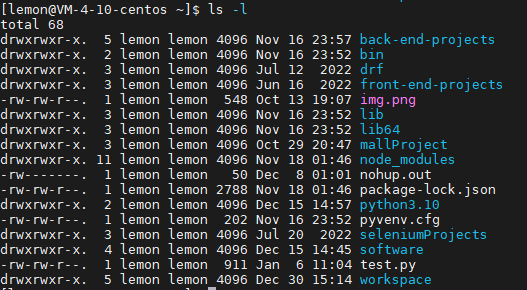
- d: (第一个字段)文件类型,还有-,d,b,c,l,s,p
- -代表是常规文件,
- d代表是文件夹-目录文件,
- -b代表block device块设备文件、支持以block为单位进行随机访问,
- -c代表character device字符设备文件、支持以character为单位进行线性访问)
- major number:主设备号,用标识设备类型,进而确定要加载的驱动程序
- minor number:次设备号,用于标识同一类型中的不同设备
- -l:symbolic link,符号链接文件
- -p:pipe,命名管道
- -s:socket,套接字文件,两个文件进行通信
- rwxrwxr-x.
- 左三位rwx:文件属主的权限;
- 中三位rwx:文件属组的权限;
- 右三位r-x:其他用户(非属主/属组)的权限;
- 末尾如果还有点号
.,说明文件还有隐藏属性 - 4096:数字代表文件的大小,单位是字节
- Nov 16 23:57: 文件最后一次修改的时间
-
-h, --human-readable:对文件大小进行单位换算;换算后的结果可能会是非精确值
-
-d:查看目录自身而非其内部的文件列表
-
-r:reberse逆序显示
-
-R:recursive,递归显示
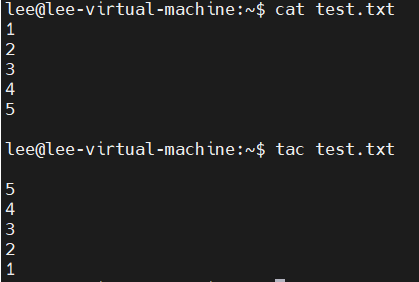
cat
concatenate
- 文件文本查看工具:
- cat /etc/fstab
- cat /stc/passwd
- cat [OPTION]... [FILE]...
- -n: 给显示的文本行编号
- -E: 显示行结束符$
- tac [OPTION]... [FILE]... // 与cat相比,文件内容是逆序的
- -n: 给显示的文本行编号
- -E: 显示行结束符$
-
file
查看文件内容类型
echo
回显
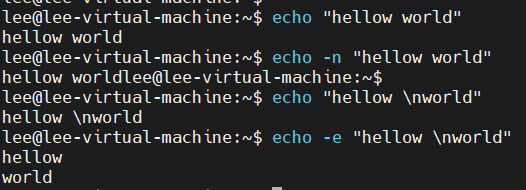
- echo [SHOT-OPTION]... [STRING]...
- STRING可以使用英豪,单引号和双引号均可使用
- 单引号:强引用,变量引用不执行替换
- ~]# ''$SHELL’
- 双引号:弱引用,变量引用会被替换
- ~]# '$SHELL'
- 注意:变量引用的正规符合
${name}
- -n: 不进行换行;
- -e: 让转义符生效
-
关机或重启命令(shutdown)
shuwdown [OPTIONS...][TIME][WALL...]
- OPTIONS:
- -h: halt
- -r:reboot
- -c:cancel
- TIME:
- now
- hh:mm
- +m
- WALL
日期相关命令
Lixun系统启动时从硬件读取日期和时间信息;读取完成以后,就不再于硬件相关联
系统时钟: date
硬件时钟: clock
date
-
显示时间 date [OPTION]... [+FORMAT] 设定日期时间 date [-u|--utc|--universal] [MMDDhhmm[[CC]YY][.ss]] -
ubuntu@VM-0-6-ubuntu:~$ date
2023年 02月 27日 星期一 22:34:46 CST
ubuntu@VM-0-6-ubuntu:~$ date +%F
2023-02-27
ubuntu@VM-0-6-ubuntu:~$ date +%H
22
ubuntu@VM-0-6-ubuntu:~$ date +%c
2023年02月27日 星期一 22时35分08秒
ubuntu@VM-0-6-ubuntu:~$ date +%H
22
ubuntu@VM-0-6-ubuntu:~$ date +%Y
2023
ubuntu@VM-0-6-ubuntu:~$ date +%M
35
ubuntu@VM-0-6-ubuntu:~$ date +%m
02
ubuntu@VM-0-6-ubuntu:~$ date +%S
44
ubuntu@VM-0-6-ubuntu:~$ date +%s
1677508570
clock, hwclock硬件时钟
- 显示或设定硬件时钟
- -s, --htcosys;以硬件为准,把系统调整为硬件时间相同;
- -w, --systohc;以系统为准,把系统调整为系统时间相同;
cal
日历
cal [[month] year]
which
-
which - shows the full path of (shell) commands
-
which [options] programname [...]
- --skip-alias:忽略别名
[root@rhino014 ~]# which ls
alias ls='ls --color=auto'
      /usr/bin/ls
[root@rhino014 ~]# which --skip-alias ls
/usr/bin/ls
whereis
whereis - locate the binary, source, and manual page files for a command(能显示二进制文件、源码文件、手册页)
man whereis 查看可选项:
SYNOPSIS
       whereis [options] [-BMS directory... -f] name...
OPTIONS
       -b     Search only for binaries.

       -m     Search only for manuals.

       -s     Search only for sources.

       -u     Only  show  the  command  names  that  have unusual entries.  A command is said to be
              unusual if it does not have just one entry of each explicitly requested  type.   Thus
              'whereis  -m  -u *' asks for those files in the current directory which have no docu‐
              mentation file, or more than one.

       -B list
              Limit the places where whereis searches for binaries, by a whitespace-separated  list
              of directories.

       -M list
              Limit  the  places where whereis searches for manuals, by a whitespace-separated list
              of directories.

       -S list
              Limit the places where whereis searches for sources, by a  whitespace-separated  list
              of directories.

       -f     Terminates  the  directory  list and signals the start of filenames.  It must be used
              when any of the -B, -M, or -S options is used.

       -l     Output list of effective lookup paths the whereis is using.  When non of -B,  -M,  or
              -S  is  specified  the  option will out hard coded paths that the command was able to
              find on system.
运用测试:
[root@rhino014 ~]# whereis -b ls # 仅搜索二进制文件路径
ls: /usr/bin/ls
[root@rhino014 ~]# whereis -m ls # 仅搜索使用手册文件路径
ls: /usr/share/man/man1/ls.1.gz /usr/share/man/man1p/ls.1p.gz
who
who - show who is logged on
who [OPTION]...
- -b 系统此次启动的时间
- -r 运行级别
[root@rhino014 ~]# who
root     pts/4        2023-03-02 17:49 (192.168.8.5)
root     pts/5        2023-03-02 16:35 (192.168.8.5)
You have mail in /var/spool/mail/root
[root@rhino014 ~]# who -b
         system boot  2022-10-03 10:30
You have mail in /var/spool/mail/root
[root@rhino014 ~]# who -d
         pts/0        2023-03-02 18:24             21113 id=ts/0  term=0 exit=0
         pts/1        2023-03-02 18:04             21814 id=ts/1  term=0 exit=0
         pts/2        2023-03-02 18:24             26833 id=ts/2  term=0 exit=0
         pts/3        2022-10-14 17:11             27715 id=ts/3  term=0 exit=0
         pts/6        2022-10-25 16:11              3776 id=ts/6  term=0 exit=0
         pts/7        2023-02-20 11:08             30255 id=ts/7  term=0 exit=0
         pts/8        2023-02-06 11:59              9349 id=ts/8  term=0 exit=0
         pts/9        2022-10-18 17:41             46290 id=ts/9  term=0 exit=0
         pts/10       2023-02-06 11:59             15423 id=s/10  term=0 exit=0
         pts/11       2022-10-04 12:30               991 id=s/11  term=0 exit=0
         pts/12       2023-02-06 09:39             11101 id=s/12  term=0 exit=0
         pts/13       2022-10-18 13:23              1726 id=s/13  term=0 exit=0
[root@rhino014 ~]# who -l
[root@rhino014 ~]# who -u
root     pts/4        2023-03-02 17:49   .          5156 (192.168.8.5)
root     pts/5        2023-03-02 16:35 02:17       43483 (192.168.8.5)
[root@rhino014 ~]# who -r
         run-level 5  2022-10-03 10:31
w
w - show who is logged on and what they are doing