
碰到了git拉代码时报出的一个错误

通过查阅资料尝试了几种方法之后解决了,在这做个记录。
首先需要检查一下SSH是否能够连接成功,输入以下命令
ssh -T git@github.com
若还是报这个错ssh: connect to host github.com port 22: Connection timed out就可以使用以下解决办法
第一步:打开终端并打开存放ssh的目录
cd ~/.ssh
ls

查看是否存在这些文件 若不存在,则可能是ssh没配置对,首先需要配置ssh(自行百度)很简单
若存在则在继续在终端输入以下命令新建一个文件
vim config
接着输入下面内容
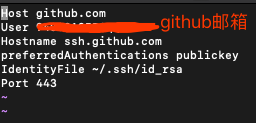
Host github.com
User 注册github的邮箱
Hostname ssh.github.com
PreferredAuthentications publickey
IdentityFile ~/.ssh/id_rsa
Port 443
最后:wq退出编辑即可
接着再执行
ssh -T git@github.com
出现提示回车yes即可

验证就能顺利通过了
总结自:https://blog.csdn.net/vosang/article/details/50499300
本文转自 https://blog.csdn.net/nightwishh/article/details/99647545,如有侵权,请联系删除。
Hey,
Have you tried this tool yet called Conversiobot? it does this…
Are you tired of watching your website traffic go to waste? Introducing ConversioBot, the high converting tool that will skyrocket your sales! bit.ly/BuyConversioBot
With ConversioBot, you can easily create your own customized chatbot to engage with your website visitors and convert them into paying customers.
With advanced AI technology and an easy-to-use interface.
Say goodbye to bouncing visitors and hello to increased sales with ConversioBot. Try it out today and watch your business soar bit.ly/BuyConversioBot!
Opt out of future messages by replying to this message or emailing WiseProducts2023@outlook.com and saying opt out.
Regards,
Dale
bit.ly/BuyConversioBot