一、介绍
1.简介
JQuery介绍:
jQuery 是一个 JavaScript 库,也是一个JS文件。 JQ中封装实现了很多方法,让使用变得更加简单不再像js那样需要使用大量的方法调用。但JQ也只是实现了一些方法,还有些没有实现,因此能够使用JQ是实现的,JS都能做,但是能够用JS做的,JQ不一定能够实现。
JQuery理念:
JQ总的来说,体现了:write less, do more。简单来说,就是代码量少,功能强大。
JQuery特性:
丰富的强大的语法(CSS选择器),来查询文档元素高效的查询方法,用来找到与CSS选择器匹配的文档元素集一套有用的方法,用来操作选中的元素强大的函数式编程技巧,用来批量操作元素集,而不是每次只操作单个简介的语言用法(链式用法),用来表示一系列顺序操作。
2.引入方法
教程:
菜鸟教程:https://www.runoob.com/jquery/jquery-tutorial.html
本文代码地址:
GitHub:https://github.com/lemonguess/my_learning_codes/tree/main/jQuery
官网:
官网地址:https://jquery.com/
国内翻译参考:http://jquery.cuishifeng.cn/
前端资源查找:https://www.bootcdn.cn/
标准版本:
JQuery完整版本,包含注释等,学习时可以参考,建议学习使用
下载地址:https://cdn.bootcss.com/jquery/3.4.1/jquery.js
压缩版:
压缩版去除了不必要的注释和空格,变量名等内部标识符也替换成更短的名字
下载地址:https://cdn.bootcss.com/jquery/3.4.1/jquery.min.js
<!DOCTYPE html>
<html lang="en">
<head>
    <meta charset="UTF-8">
    <title>jq引入</title>
</head>
<body>
<script src="https://cdn.bootcdn.net/ajax/libs/jquery/3.4.1/jquery.min.js"></script>
<script>
    /* $() jq的代表符号 */
    $(function (){
        alert(1);
    })
</script>

</body>
</html>
注意:
在JQ中,$()是最重要的方法,可以传递CSS选择器、Element、Document或者Window对象、HTML文本字符串、函数、字符串等对象注意:JQ的API只对自己开放,JQ不能用js的API,js也不能用JQ的API
二、JQeury操作HTML属性
1.操作类名
-
addClass 加class名字
-
removeClass 移除传入的class; 没有,移除全部
-
toggleClass 操作class类名,有就删,没有则加
<!DOCTYPE html>
<html lang="en">
<head>
    <meta charset="UTF-8">
    <title>jq操作HTML元素</title>
</head>
<body>
<div>111</div>
<script src="/js/jquery.js"></script>
<script>
    /* 操作class类名 */
    $("div").addClass("box"); //增加的操作
    $("div").addClass("box1 box2"); //增加多个 空格隔开就行
    $(".box2").addClass("box9"); //css选择器,其中一个class名称也能命中
    $("div").removeClass("box2"); //移除传入的class名——box2
    $("div").removeClass(); //移除全部
    /*
    * toggleClass("属性名", "属性值"),
    * 无则增,有则删
    *  */
    $("div").toggleClass("box");
    $("div").toggleClass("box3");
</script>

</body>
</html>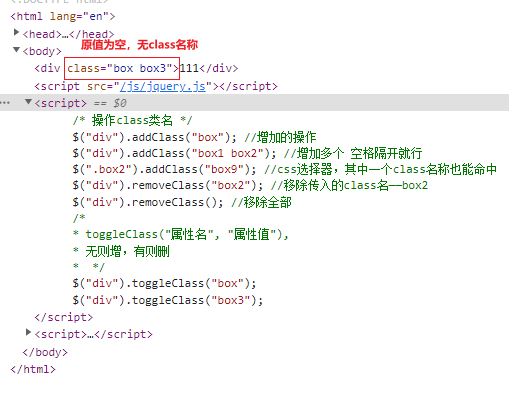
2.操作属性
-
attr 设置、获取 标签属性
-
removeAttr() 移除标签属性
<!DOCTYPE html>
<html lang="en">
<head>
    <meta charset="UTF-8">
    <title>jq操作HTML元素</title>
</head>
<body>
<div id="001">111</div>
<script src="/js/jquery.js"></script>
<script>
    /* 操作属性 */
    $("div").removeAttr("id") //删除id属性
    /*
    * attr("属性名", "属性值"),
    * 无则增,有则改(直接覆盖)
    *  */
    $("div").attr("class", "box02") //添加class属性,值为002
</script>

</body>
</html>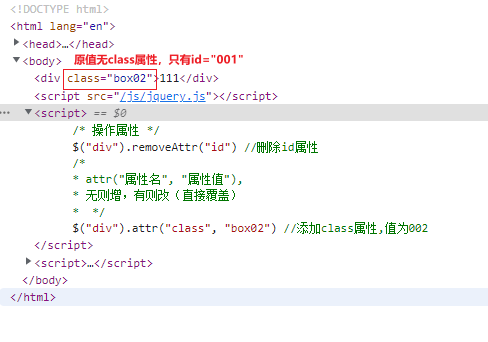
三、操作CSS样式
<!DOCTYPE html>
<html lang="en">
<head>
    <meta charset="UTF-8">
    <title>操作CSS样式</title>
    <style>
        #box{
            width: 200px;
            height: 200px;
            padding: 50px;
            border: 3px solid red;
            background: goldenrod;
            margin: 50px auto;
            position: relative;
        }
        #wrap{
            width: 50px;
            height: 50px;
            background: blueviolet;
            position: absolute;
            top: 50px;
            left: 60px;
        }
    </style>
</head>
<body>
<div id="box">
  <div id="wrap">

  </div>
</div>
<script src="/js/jquery.js"></script>
<script>
    console.log($("#box").width()); //获取宽
    console.log($("#box").innerWidth()); //获取加上padding的宽
    console.log($("#box").outerWidth()); //获取加上padding、加上border的宽

    $("#box").css("width", "400px") //只能操作一个样式
    $("#box").css({//操作多个样式,以键值对的形式
        "width": "400px", //px可加可不加
        "height": "400px",
    });

    console.log($("#box").offset().left);//到浏览器左端的距离
    console.log($("#box").offset().top);//到浏览器上端的距离

    console.log($("#wrap").position().left); //到父级定位左端的距离
    console.log($("#wrap").position().top); //到父级定位上端的距离
</script>
</body>
</html>
四、JQuery事件
1.js事件和jq事件的区别
JS的事件通过赋值来实现,如点击事件绑定的函数,后一个函数会将前一个覆盖
<!DOCTYPE html>
<html lang="en">
<head>
    <meta charset="UTF-8" typeof="javascript">
    <title>jq事件</title>
    <style>
        li{
            list-style: none;
        }
    </style>
</head>
<body>
<ul id="box">
    <li>001</li>
    <li>002</li>
    <li>003</li>
    <li>004</li>
</ul>
<script src="/js/jquery.js"></script>
<script>
    //js通过赋值来实现
    const oBox = document.querySelector("#box");
    oBox.onclick = function(){
        console.log(1);
    };
    // 并且会以后面的为准,之前的会被覆盖掉(不会再打印1)
    oBox.onclick = function(){
        console.log(2);
    }
</script>
</body>
</html>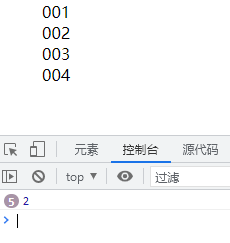
jq是采用方法调用的方式,并且不会覆盖
<!DOCTYPE html>
<html lang="en">
<head>
    <meta charset="UTF-8" typeof="javascript">
    <title>jq事件</title>
    <style>
        li{
            list-style: none;
        }
    </style>
</head>
<body>
<ul id="box">
    <li>001</li>
    <li>002</li>
    <li>003</li>
    <li>004</li>
</ul>
<script src="/js/jquery.js"></script>
<script>
    // jq是采用方法调用的方法,并且不会覆盖
    $("#box").click(()=>{
        console.log(1)
    });
    $("#box").click(()=>{
        console.log(2)
    });
</script>
</body>
</html>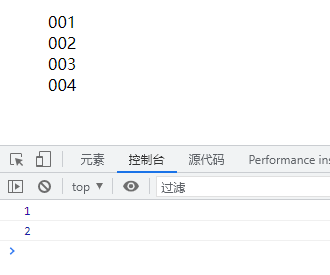
2.常用事件操作
详细教程:https://www.runoob.com/jquery/jquery-ref-events.html
<!DOCTYPE html>
<html lang="en">
<head>
    <meta charset="UTF-8" typeof="javascript">
    <title>jq事件</title>
    <style>
        li{
            list-style: none;
        }
    </style>
</head>
<body>
<ul id="box">
    <li>001</li>
    <li>002</li>
    <li>003</li>
    <li>004</li>
    <li>005</li>
</ul>
<script src="/js/jquery.js"></script>
<script>
    // jq-鼠标滑入mouseenter
    $("#box > li:nth-child(1)").mouseenter(()=>{
        console.log("滑进来了")
    });
    // jq-鼠标滑出mouseleave
    $("#box > li:nth-child(2)").mouseleave(()=>{
        console.log("滑出去了")
    });
    // jq-鼠标滑入或滑出hover
    $("#box > li:nth-child(3)").hover(()=>{
        console.log("hover")
    });
    // jq-鼠标滑入或滑出hover,写两个的话,第一个事件是滑入,第二个是滑出
    $("#box > li:nth-child(4)").hover(()=>{
        console.log("滑进来了")
    }, ()=>{
        console.log("滑出去了")
    });
    // 尝试绑定两个相同事件--同时打印了hover和hover*2
    $("#box > li:nth-child(3)").hover(()=>{
        console.log("hover*2")
    });
    //用on绑定一个事件(on绑定事件方法-无法使用hover???)
    $("#box > li:nth-child(5)").on("mouseenter", ()=>{
        console.log("第五元素:绑定单一事件-滑入")
    })
    // 用on绑定多个事件
    $("#box > li:nth-child(5)").on({
        "click": ()=>{//点击事件
            console.log("第五元素:绑定多个事件-点击")
        },
        "mouseleave": ()=>{//hover事件
            console.log("第五元素:绑定多个事件-滑出")
        }
    })
    //事件的移除
    $("#box > li:nth-child(5)").off("click"); //移除点击事件
    $("#box > li:nth-child(5)").off(); //移除所有事件
</script>
</body>
</html>
五、JQuery动画
菜鸟教程:https://www.runoob.com/jquery/jquery-animate.html
1.显示/隐藏/淡入/淡出
- show 显示
- hide 隐藏
- toggle 自动显示隐藏
- fadeIn /fadeOut /fadeTo(1000, 0.1) 可以把透明度设置一个值,时间参数不能省略
- slideDown/slideUp/slideToggle 改变高度
<!DOCTYPE html>
<html lang="en">
<head>
    <meta charset="UTF-8">
    <title>jq动画</title>
    <style>
        /*.btn2{*/
        /*    margin-left: 50px;*/
        /*}*/
        #box{
            width: 200px;
            height: 200px;
            background: green;
        }
    </style>
</head>
<body>
<button class="btn1">隐藏</button>
<button class="btn2">显示</button>
<button class="btn3">向上隐藏</button>
<button class="btn4">向下隐藏</button>
<button class="btn5">取反</button>
<button class="btn6">自动显示和隐藏</button>
<button class="btn7">淡入</button>
<button class="btn8">淡出</button>
<button class="btn9">自定义淡出(可改透明度)</button>
<div id="box"></div>
<script src="/js/jquery.js"></script>
<script>
    $(".btn1").click(()=>{
        $("#box").hide()//隐藏

    })
    $(".btn2").click(()=>{
        $("#box").show()//显示
    })
    $(".btn3").click(()=>{
        $("#box").slideUp(2000)//向上隐藏,2000毫秒
    })
    $(".btn4").click(()=>{
        $("#box").slideDown(2000)//向下显示,2000毫秒
    })
    $(".btn5").click(()=>{
        $("#box").slideToggle(2000)//取反操作,2000毫秒
    })
    $(".btn6").click(()=>{
        $("#box").toggle()//取反操作,无延时效果
    })
    $(".btn7").click(()=>{
        $("#box").fadeIn(1000)//淡入,参数:时间)
    })
    $(".btn8").click(()=>{
        $("#box").fadeOut(1000)//淡出,参数:时间
    })
    $(".btn9").click(()=>{
        $("#box").fadeTo("1000", 0.2)//自定义淡出,参数:(时间, 透明度);其中时间参数不能少
    })
</script>
</body>
</html>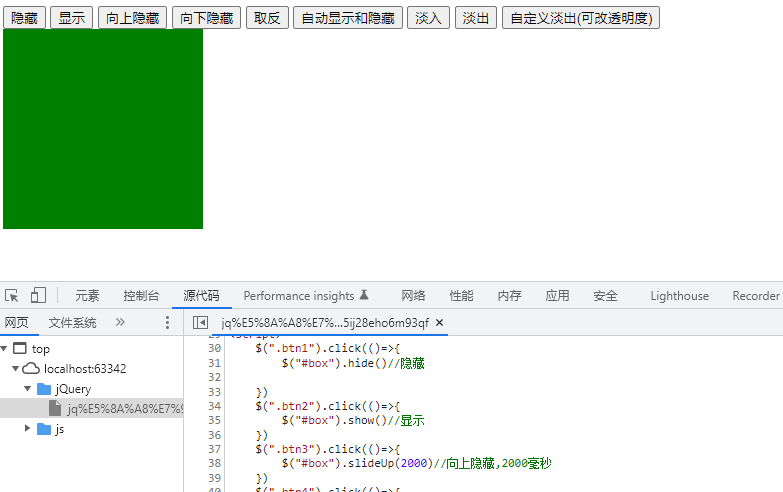
2.animate
- 颜色无法修改
<!DOCTYPE html>
<html lang="en">
<head>
    <meta charset="UTF-8">
    <title>jq动画2</title>
    <style>
        /*.btn2{*/
        /*    margin-left: 50px;*/
        /*}*/
        #box{
            width: 200px;
            height: 200px;
            background: green;
            position: relative;
        }
    </style>
</head>
<body>
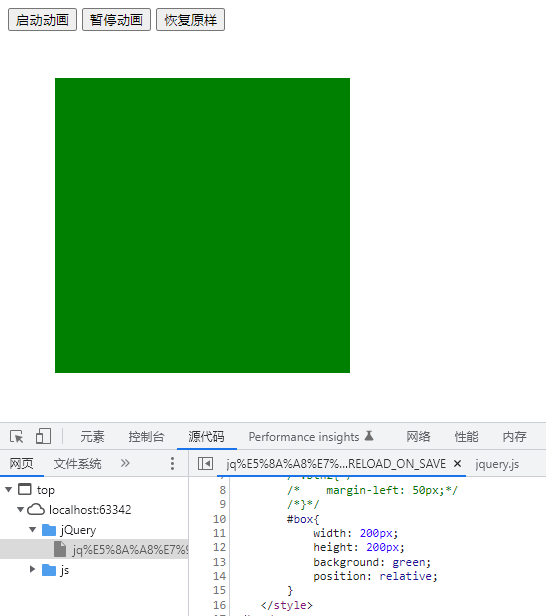
<button class="btn1">启动动画</button>
<button class="btn2">暂停动画</button>
<button class="btn3">恢复原样</button>
<div id="box"></div>
<script src="/js/jquery.js"></script>
<script>
    $(".btn1").click(()=>{
       $("#box").animate({
           "width": "400px",
           "height": "400px",
           "top": "100px",
           "left": "100px",
       }, 2000).delay(4000).fadeOut(1000)//延迟动画4000毫秒,再淡出
    });
    $(".btn2").click(()=>{
        //停止动画 只是暂停,不是清除;
        //再点击btn2,会恢复btn1动画效果
        //默认false,如果不设置true再点击btn1会延迟后再运行,设置true后会立即恢复运行动画;
        //参数设置(false, true)两个参数,恢复btn1动画后会立即执行完动画,不再有delay效果(不会清除动画队列,仍然会淡出)
        //参数设置(true, true)两个参数,恢复btn1动画后会立即执行完动画,不再有delay效果(会清除动画队列,不会再淡出)
        $("#box").stop(true)
    })
    $(".btn3").click(()=>{
        $("#box").animate({
            "width": "200",
            "height": "200",
        }, 2000).delay(4000)//延迟动画4000毫秒
    });
</script>
</body>
</html>